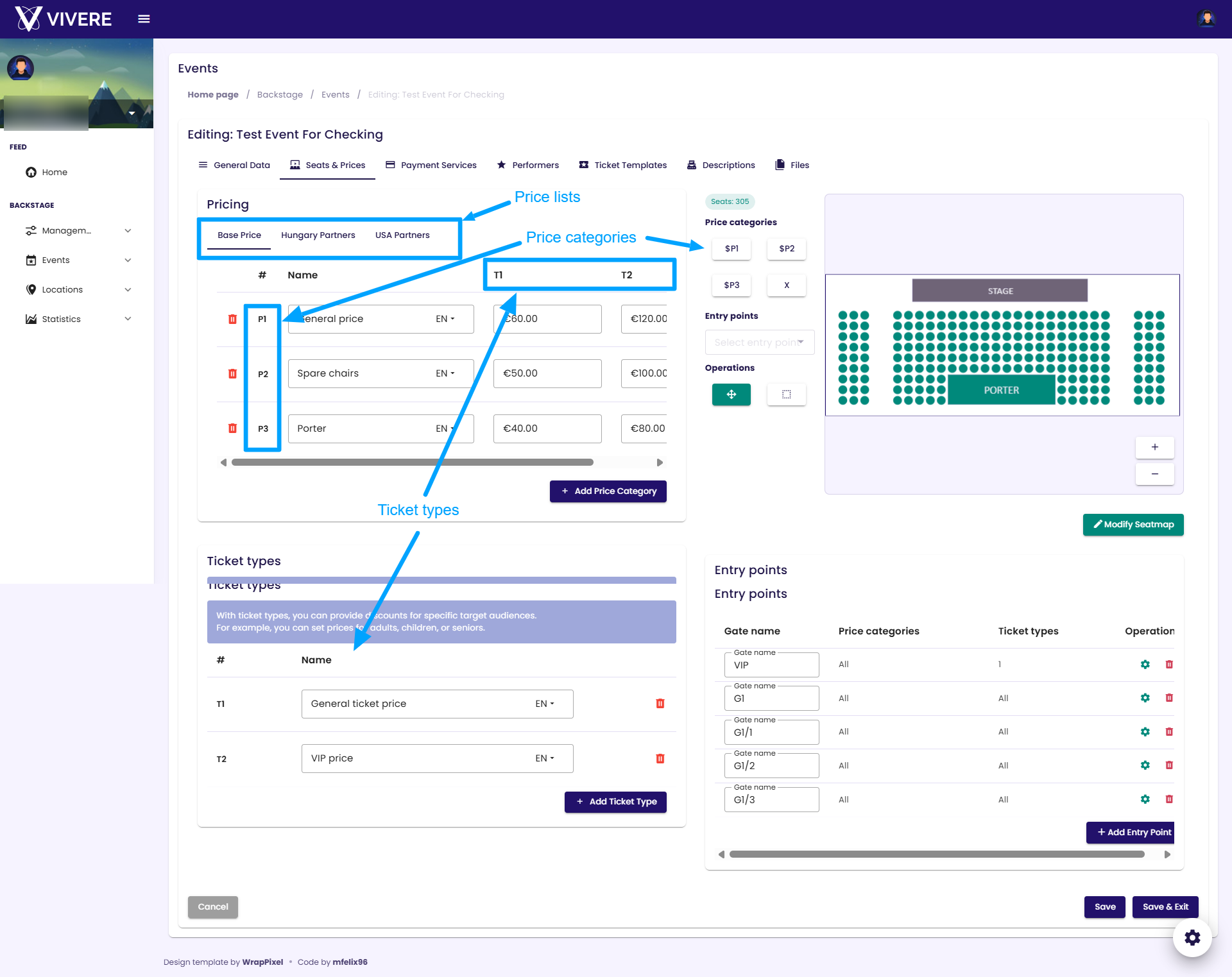
Event pricing
Price List             Price Category             Ticket Type
  - Standard             - Standard                 - Standard
  - Partner              - Standing                 - Child
  - Discount             - Box                      - VIP
  - ...                  - ...                      - ...
Ticket prices are determined by the combination of three parameters:
- Price List
- Price Category
- Ticket Type
Price List
A price list determines which prices are available for a specific user.
If a user is assigned to a price list and is logged into the platform, the prices from that list will be applied. Otherwise, the user will see the default price list. The default price list can be configured in the Price Lists module.
Price Category
Price categories can be assigned to seats when the event uses a seating plan. For general admission events without assigned seating, the categories are displayed as selectable options during ticket purchase.
Important: To sell tickets, you must create at least one price category and define prices for it.
Ticket Type
Ticket types provide an additional pricing level. They can be used to define prices for children, students, seniors, VIP tickets, or any other ticket classification.
Important: To sell tickets, you must create at least one ticket type and define prices for it.